


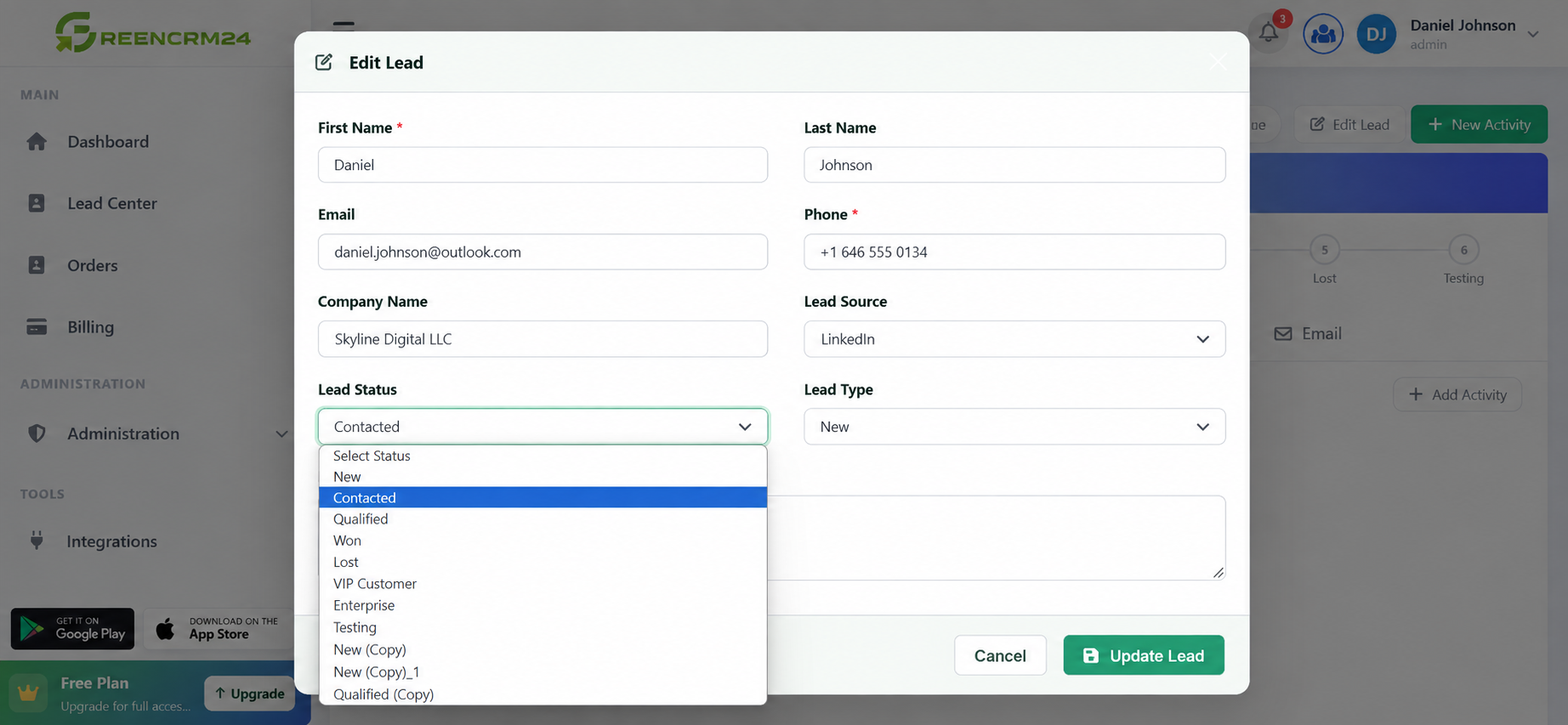
Keeping your deal status updated is an important part of managing leads in GreenCRM24. It helps your sales team understand where each lead currently stands and makes it easier to track opportunities from the first enquiry to the final outcome. You can update the status of a lead whenever there is a change in the customer's interest or sales progress.
How to Update a Deal Status
1. Log in to GreenCRM24
Sign in to your GreenCRM24 account using your registered login details. After logging in, you will be taken to your CRM dashboard.
2. Go to the Lead Center
From the dashboard, open the *Lead Center*. Here, you can view and manage the leads assigned to you or your team.
3. Select a Lead
Find the lead you want to update and open the particular lead record. Review the available lead information before making any changes.
4. Click "Edit Lead"
Click the Edit Lead option to open the lead details. You can review and update the information related to the lead.
5. Update the Lead Status
Find the *Lead Status* field and select the appropriate status based on the current stage of the opportunity.
For example, a lead may be marked as:
Qualified – The lead has shown genuine interest and meets your sales criteria.
Won – The customer has completed the purchase or deal.
Lost – The opportunity is no longer moving forward.
Select the status that accurately represents the current situation and save the changes.
Why Keep Deal Status Updated?
Regularly updating lead status gives your sales team a clearer view of the sales pipeline. It also helps managers monitor opportunities, identify active leads, and understand which leads have been won or lost.
With GreenCRM24, your team can keep lead information and sales progress organized in one centralized CRM system, making it easier to manage opportunities from lead capture to conversion.
