


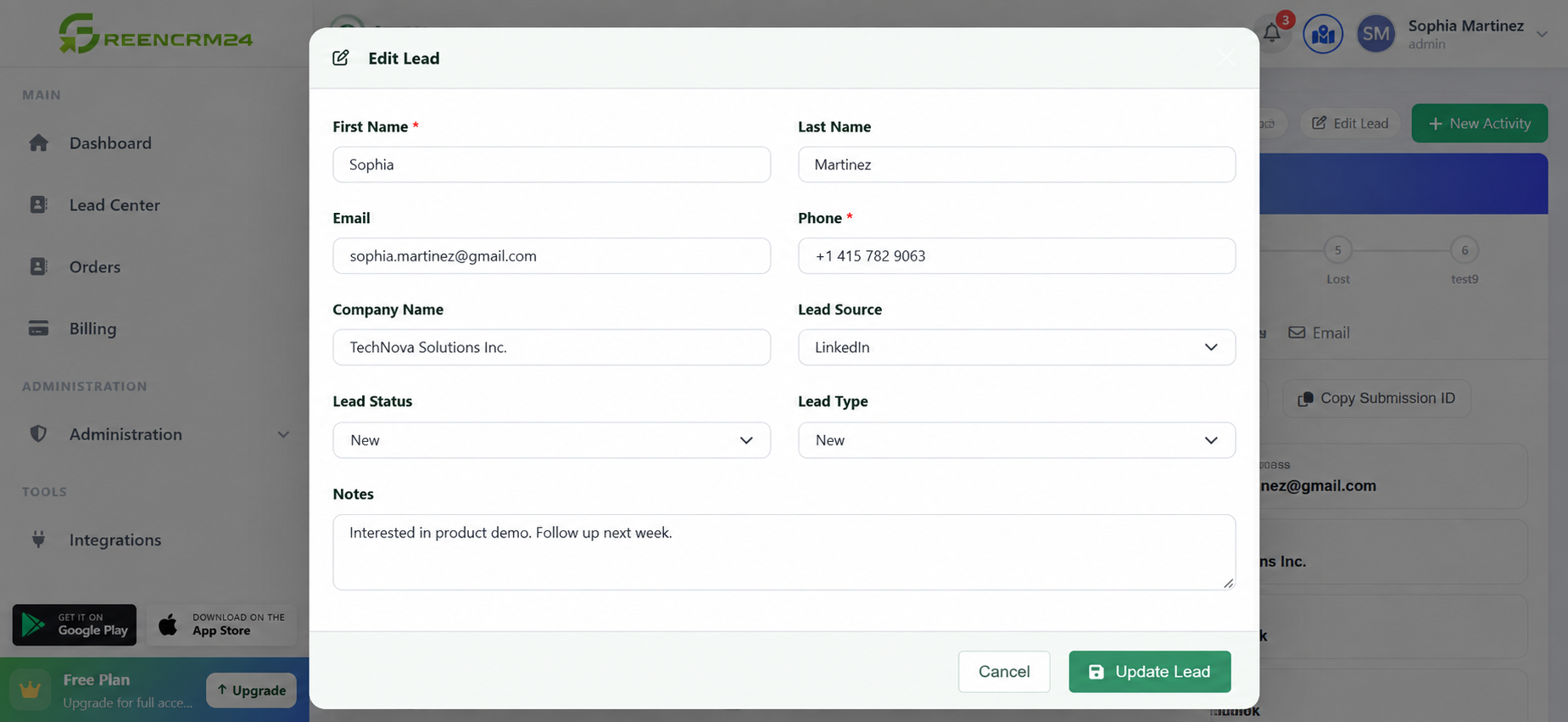
Lead information can change as you talk to customers. A phone number may be updated, a customer may share a new requirement, or the lead status may need to be changed after a follow-up. GreenCRM24 makes it easy to update lead information so your team always has the latest details.
Steps to Edit a Lead
1. Log in to GreenCRM24
Open your GreenCRM24 account and go to your dashboard.
2. Open the Leads Center
Go to the *Leads* area to see the leads available in your account.
3. Find the lead you want to update
Search or browse the lead list and select the lead you want to edit.
4. Edit Lead
Review the existing details and make the required changes. You can update information such as contact details, lead status, notes, or other available lead fields.
5. Add important notes
If you have spoken with the customer, add a short note about the conversation or their latest requirement. This gives your team useful context for the next follow-up.
6. Update the lead status
Keep the lead status current based on your latest interaction. This helps everyone understand where the lead stands in the sales process.
7. Save your changes
Review the updated information and save it. The latest details will then be available to your team.
Why Keep Lead Information Updated?
Keeping lead information accurate helps avoid confusion and makes follow-ups more effective. GreenCRM24 is designed to help teams track lead ownership, status, notes, and follow-up activities from one place.
Quick Tip
Make it a habit to update a lead immediately after a call or follow-up. Small updates, such as a new requirement or change in status, can make a big difference when the next team member contacts the customer.
Remember: Your CRM is only as useful as the information inside it. Keeping lead details updated helps your team stay organised and respond to customers with the right information at the right time.
