



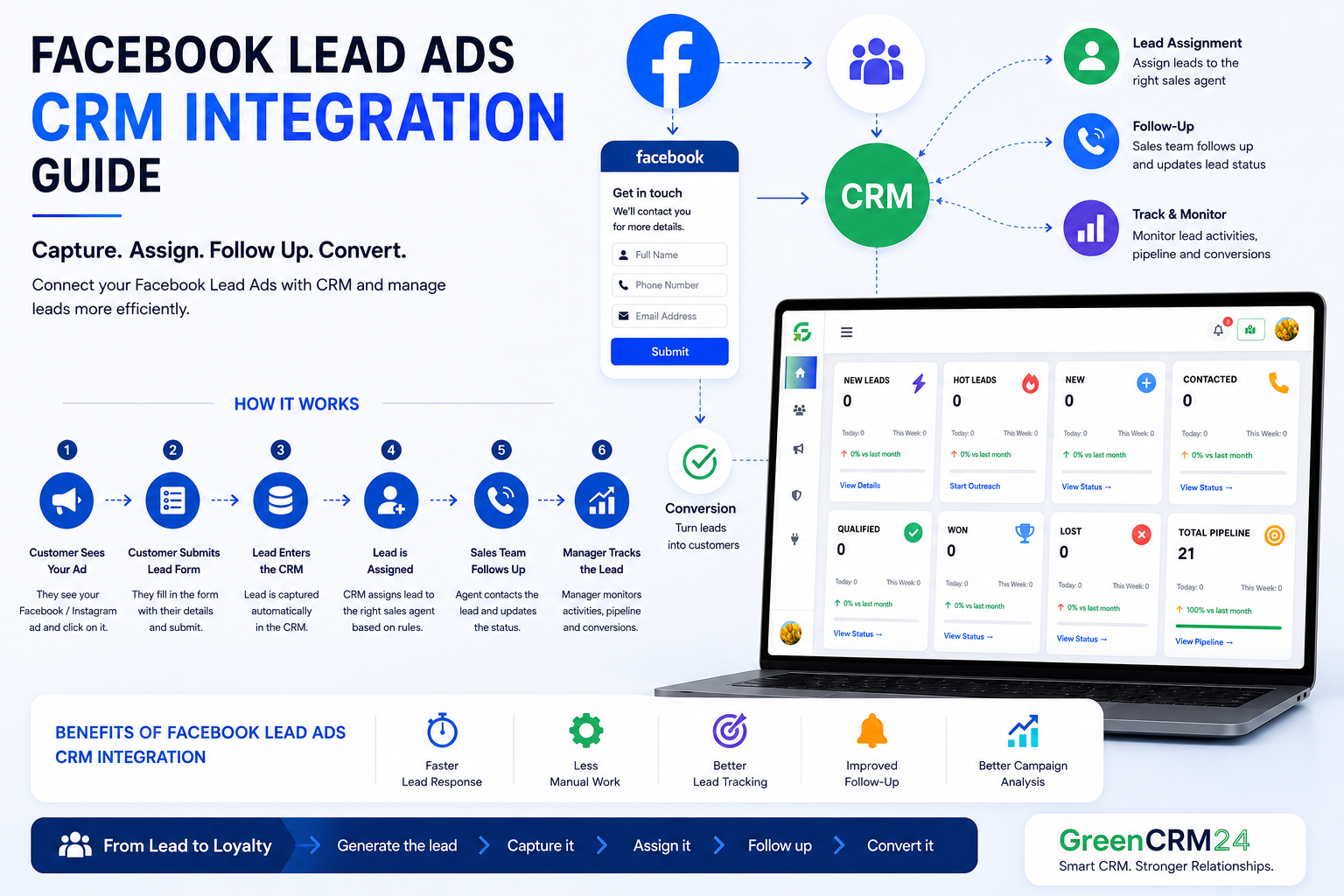
Facebook Lead Ads make it easy for businesses to collect customer information directly from Facebook and Instagram. But collecting leads is only the first step. The real challenge starts when your sales team needs to receive, assign, follow up, and track those leads quickly. This is where Facebook Lead Ads CRM integration becomes useful.
What Is Facebook Lead Ads CRM Integration?
Facebook Lead Ads CRM integration connects your Meta lead forms with your CRM system.
When a customer submits a form through a Facebook or Instagram Lead Ad, the lead information can be transferred to the CRM instead of being managed manually.
A typical process looks like:
Facebook / Instagram Ad → Lead Form → CRM → Lead Assignment → Follow-Up → Conversion
This creates a more organized way to manage leads from the moment they are generated.
Why Connect Facebook Lead Ads With a CRM?
Without CRM integration, businesses may need to download leads, check spreadsheets, or manually share enquiries with sales representatives.
This can create delays and increase the possibility of missed follow-ups.
With CRM integration, businesses can:
- Capture Facebook leads in one place
- Automatically organize new enquiries
- Assign leads to sales agents
- Track follow-up activities
- Monitor lead status
- Measure conversions
- Manage the complete sales pipeline
How Facebook Lead Ads CRM Integration Works
The basic workflow is simple.
1. Customer Sees Your Ad
A potential customer sees your Facebook or Instagram advertisement and clicks the call-to-action.
2. Customer Submits the Lead Form
The customer enters information such as their name, phone number, email address, location, or requirement.
3. Lead Enters the CRM
With a connected CRM integration, the lead can be transferred into your CRM system for further management.
4. Lead Is Assigned
The CRM can assign the lead to the appropriate salesperson based on your business rules, such as location, product, territory, or sales team.
5. Sales Team Follows Up
The salesperson can contact the customer and update the lead status directly in the CRM.
6. Manager Tracks the Lead
Managers can monitor follow-ups, sales activities, lead stages, and conversions from the CRM dashboard.
Benefits of Facebook Lead Ads CRM Integration
Faster Lead Response
New leads can reach the sales team faster, helping reduce the delay between enquiry and follow-up.
Less Manual Work
Your team doesn't need to repeatedly download, copy, and distribute Facebook leads manually.
Better Lead Tracking
Every lead can have a clear status and assigned salesperson, making it easier to understand what is happening with each enquiry.
Improved Follow-Up
CRM reminders and workflows can help sales teams stay on top of pending leads.
Better Campaign Analysis
Connecting advertising leads with CRM data can help businesses understand what happens after a lead is generated—not just how many leads the campaign produced.
Facebook Lead Ads CRM Integration for Real Estate
Real estate businesses often generate a high volume of leads through Facebook and Instagram campaigns.
For example:
Facebook Ad → Property Enquiry → CRM → Sales Agent → Site Visit → Follow-Up → Booking
Instead of keeping leads in separate systems, a CRM can help the marketing and sales teams work from the same lead information.
This makes it easier to identify which campaigns generate enquiries and which leads move toward actual sales.
GreenCRM24 and Facebook Lead Management
For businesses running Facebook Lead Ads, connecting advertising enquiries with a CRM can create a smoother sales workflow.
GreenCRM24 helps businesses manage leads, assignments, follow-ups, and sales activities from a centralized CRM platform.
The goal is simple:
Generate the lead → Capture it → Assign it → Follow up → Convert it.
Conclusion
Facebook Lead Ads can generate valuable customer enquiries, but the way those leads are managed after submission is equally important.
Facebook Lead Ads CRM integration helps businesses reduce manual lead handling, speed up lead assignment, organize follow-ups, and track the journey from enquiry to conversion.
For growing businesses, connecting lead generation with CRM management can turn a simple advertising campaign into a more complete and measurable sales process.
Frequently Asked Questions
What is Facebook Lead Ads CRM integration?
It connects Facebook or Instagram Lead Ads with a CRM so that customer enquiries can be managed within the CRM.
Why should Facebook leads be connected to a CRM?
CRM integration helps businesses organize leads, assign them to salespeople, track follow-ups, and monitor conversions.
Can Facebook leads be automatically assigned to sales agents?
Yes, depending on the CRM and integration setup, leads can be automatically assigned using predefined rules such as location, product, territory, or sales team.
Is Facebook Lead Ads CRM integration useful for real estate?
Yes. Real estate companies often receive a large number of enquiries from Facebook and Instagram campaigns, making centralized lead capture and follow-up especially useful.
