



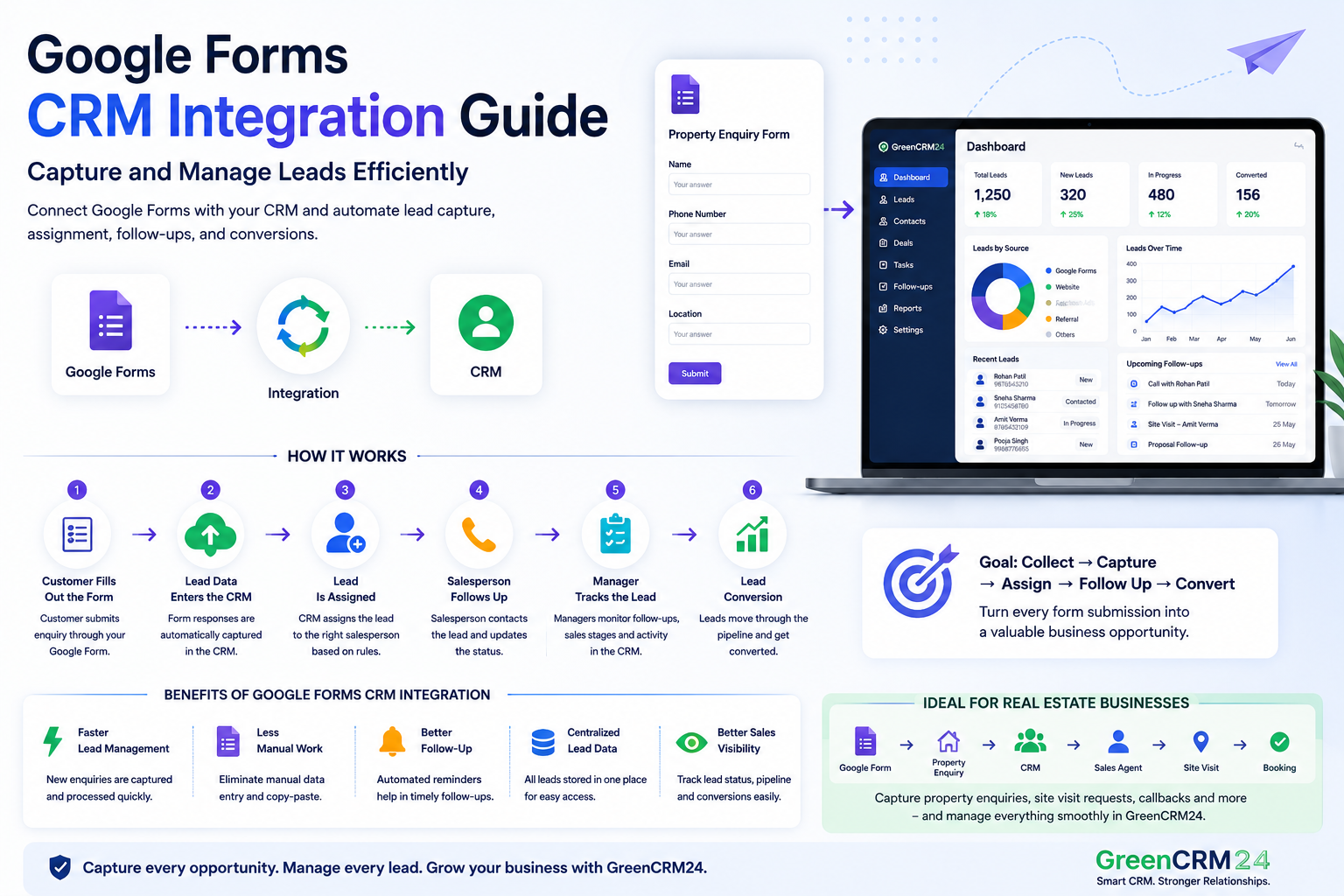
Google Forms is a simple way for businesses to collect customer enquiries, registrations, feedback, and lead information. But once a business starts receiving many responses, managing those leads manually in Google Sheets can become difficult. This is where Google Forms CRM integration can help.
What Is Google Forms CRM Integration?
Google Forms CRM integration connects a Google Form with a CRM system so that information submitted through the form can be transferred into the CRM for lead management.
A simple workflow looks like:
Google Form → Lead Captured → CRM → Lead Assignment → Follow-Up → Conversion
Instead of manually checking form responses and sharing them with salespeople, businesses can create a more organized lead management process.
Why Connect Google Forms With a CRM?
When Google Forms is used without CRM integration, teams may need to regularly check responses, copy information, and assign enquiries manually.
This can result in delays and missed follow-ups.
With CRM integration, businesses can:
- Capture form enquiries in one place
- Organize customer information
- Assign leads to sales agents
- Track follow-ups
- Monitor lead status
- Manage sales opportunities
- Track conversions
How Does Google Forms CRM Integration Work?
The process is straightforward.
1. Customer Fills Out the Form
A customer submits information such as their name, phone number, email, location, or requirement through your Google Form.
2. Lead Data Enters the CRM
With the appropriate integration or automation setup, the submitted information can be transferred to the CRM.
3. Lead Is Assigned
The CRM can assign the lead to a salesperson based on business rules such as location, product, territory, or team.
4. Salesperson Follows Up
The assigned salesperson contacts the customer and updates the lead status in the CRM.
5. Manager Tracks the Lead
Managers can monitor lead activity, follow-ups, sales stages, and conversions from the CRM dashboard.
Benefits of Google Forms CRM Integration
Faster Lead Management
New enquiries can move from the form to the sales process without relying entirely on manual data entry.
Less Manual Work
Sales and administrative teams spend less time copying information from Google Sheets and assigning leads.
Better Follow-Up
CRM reminders and workflows can help sales teams manage pending enquiries more effectively.
Centralized Lead Data
Instead of keeping customer information across different spreadsheets, businesses can manage leads in one centralized CRM.
Better Sales Visibility
Managers can see which leads are new, contacted, in progress, or converted.
Google Forms CRM Integration for Real Estate
Google Forms can be useful for real estate businesses collecting property enquiries, site-visit requests, callback requests, or campaign responses.
For example:
Google Form → Property Enquiry → CRM → Sales Agent → Follow-Up → Site Visit → Booking
Connecting the form with a CRM helps the marketing and sales teams work with the same lead information.
Google Forms + GreenCRM24
For businesses using Google Forms to generate enquiries, connecting forms with a CRM can make lead management more structured.
GreenCRM24 helps businesses manage leads, assignments, follow-ups, and sales activities from a centralized CRM platform.
The goal is simple:
Collect → Capture → Assign → Follow Up → Convert
Conclusion
Google Forms is useful for collecting information, but managing a growing number of responses manually can become time-consuming.
Google Forms CRM integration helps businesses move form enquiries into a structured sales process, making it easier to assign leads, manage follow-ups, and track conversions.
For businesses generating leads through online forms, combining Google Forms with a CRM can create a smoother and more efficient lead management workflow.
Frequently Asked Questions
What is Google Forms CRM integration?
It connects Google Forms with a CRM so that information submitted through forms can be managed as leads or customer records.
Why should Google Forms be connected to a CRM?
CRM integration can reduce manual data entry, improve lead assignment, organize follow-ups, and provide better visibility into the sales process.
Can Google Form leads be automatically assigned to sales agents?
Yes, depending on the CRM and integration setup, leads can be assigned using rules such as location, product, territory, or sales team.
Is Google Forms CRM integration useful for real estate?
Yes. Real estate businesses can use forms to collect property enquiries, callback requests, and site-visit leads and then manage those enquiries through a CRM.
