



When people think about lead generation tools, Google Forms usually isn't the first thing that comes to mind — it feels more like something you'd use for a school survey or an RSVP list. But a surprising number of small businesses use it as a genuine lead capture tool, and honestly, it's a smarter choice than it gets credit for. Let's talk about why it works, where it falls short, and how to actually use it well.
Why Google Forms, of All Things?
Google Forms has a few things going for it that make it appealing for small businesses specifically:
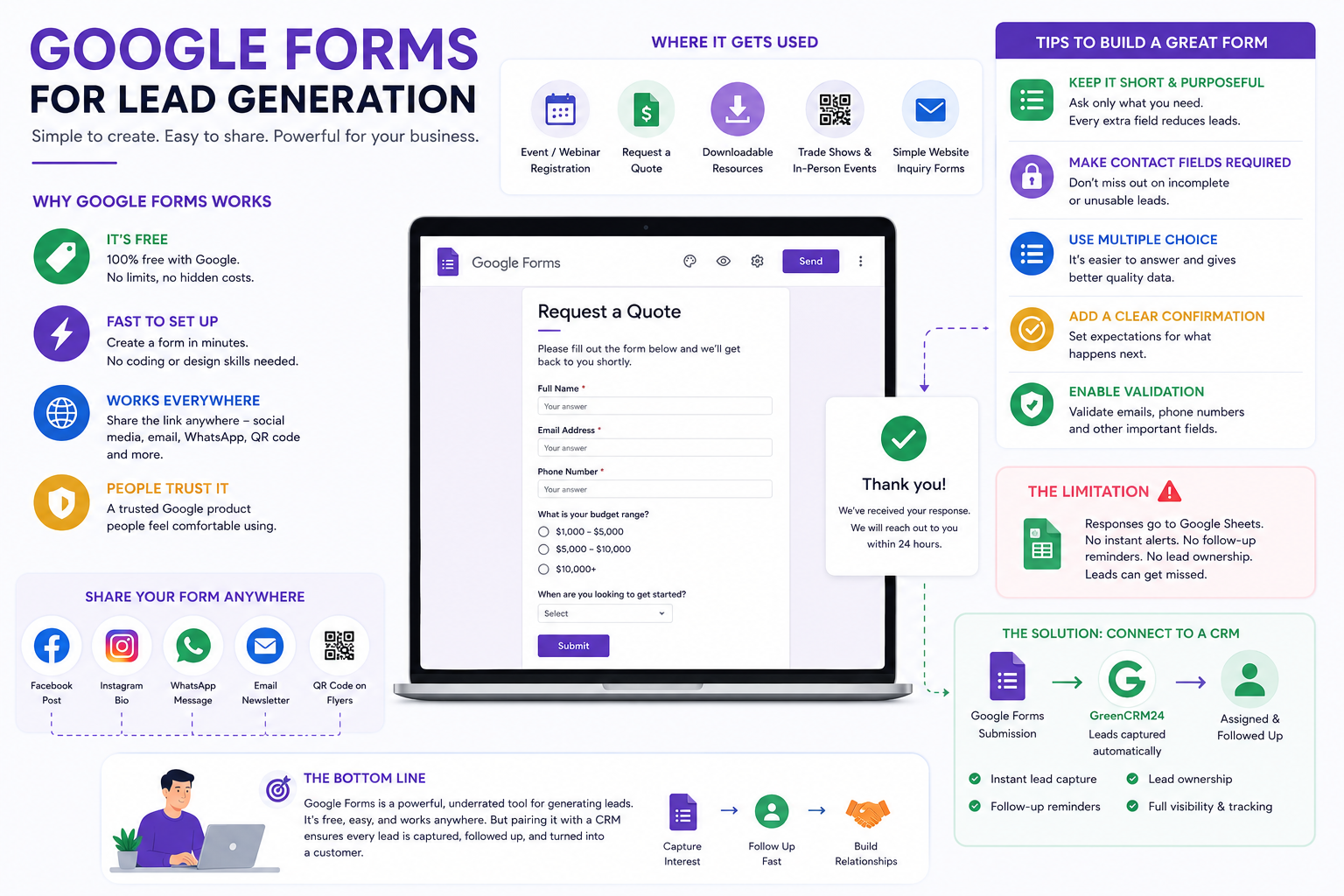
It's free. No subscription, no per-response limits, no upsell screens. For a business just getting started, that matters.
It's fast to set up. You can build a working form in ten minutes, no design skills or website access required.
It works everywhere. You can drop the link in a Facebook post, an Instagram bio, a WhatsApp message, a QR code on a flyer, an email newsletter — anywhere you can share a link.
People trust it. Because it's a recognizable Google product, people are generally comfortable filling it out — it doesn't look like a sketchy third-party form.
For a business running a webinar sign-up, an event registration, a "request a quote" page, or even just a simple "get in touch" link for social media, Google Forms genuinely gets the job done without needing a developer or a paid tool.
Where It Actually Gets Used
Google Forms tends to show up in a few common lead generation scenarios:
- Event or webinar registration — collecting names and emails ahead of a live session
- "Request a quote" links shared on social media or in bio links
- Downloadable content gates — someone fills in their email to receive a guide, checklist, or price list
- Trade shows and in-person events — a QR code that opens a short form, used instead of a paper sign-up sheet
- Simple inquiry forms embedded on a website that doesn't have a built-in contact form
It's rarely the only lead source for a business, but it's often a genuinely useful supplementary one.
How to Actually Build a Good Lead-Capture Form
A Google Form built carelessly gets careless responses. A few things make a real difference:
Keep it short, but purposeful. Name, contact info, and one or two qualifying questions is usually the sweet spot. Every extra field lowers completion rates, so only ask what you'll actually use.
Make the contact field required. This sounds obvious, but it's easy to forget — if the email or phone field isn't marked as required, you'll end up with unusable submissions from people who skipped it.
Use multiple choice for qualifying questions. Typing takes effort; tapping doesn't. A quick multiple-choice question ("What's your budget range?" or "When are you looking to get started?") gets more honest, complete answers than an open text box.
Add a clear confirmation message. Google Forms lets you customize what someone sees after submitting. Use it to set expectations — "Thanks! We'll reach out within 24 hours" — rather than leaving the default generic message.
Turn on response validation where it matters. For phone numbers or emails, Google Forms can validate the format before someone submits, which cuts down on typos that make a lead unreachable.
The Real Limitation: What Happens After Submission
Here's where Google Forms starts to show its age as a lead generation tool. By default, responses land in a connected Google Sheet — which means, just like Excel, someone has to actually go check it. There's no built-in notification system telling your sales team "hey, someone just submitted a form and is waiting to hear back." There's no reminder to follow up. There's no way to assign the lead to a specific person.
For a solo founder checking their own form once a day, that might be manageable. But the moment more than one person is involved, or leads start coming in from a form alongside other sources — Facebook ads, a Shopify store, a website contact form — a spreadsheet full of Google Form responses becomes just another disconnected list to manually check, alongside everything else.
This is the same pattern as most manual lead sources: the tool is fine for capturing the lead. It just wasn't built for what happens next.
Connecting Google Forms to Something That Actually Follows Up
The fix here isn't to abandon Google Forms — it's genuinely useful for what it does. The fix is making sure form responses don't just sit in a spreadsheet waiting to be noticed.
If Google Forms is feeding into a CRM automatically, every submission becomes a proper lead the moment someone hits submit — with an owner assigned, a follow-up reminder set, and full visibility for whoever's managing the team. This is one of the more overlooked integrations to check for when picking a CRM, since a lot of small businesses genuinely do rely on Google Forms day to day. GreenCRM24, for instance, connects directly to Google Forms alongside Facebook Lead Ads and Shopify, so a form response turns into an actionable lead automatically, instead of another row in a sheet nobody's checking.
When Google Forms Isn't Enough on Its Own
To be fair, Google Forms has real limits. It's not built for complex branching logic, it doesn't look as polished as a custom landing page, and it offers no built-in way to track which leads actually convert into customers over time. For a business that's scaled past the basics — running multiple campaigns, needing detailed reporting, wanting a more branded experience — a dedicated landing page tool might eventually make more sense.
But for getting started, or for simple, specific use cases like event sign-ups or quick inquiry links, it's hard to beat something free, familiar, and fast to set up.
The Bottom Line
Google Forms is a genuinely solid, underrated lead generation tool for small businesses — cheap, quick to build, and works anywhere you can share a link. Its real weakness isn't the form itself, it's what happens after someone submits it. Without something actively pulling those responses into a system that reminds your team to follow up, even a well-built form can quietly generate leads that never get a proper response.
The form's job is to capture interest. Making sure that interest doesn't go cold is the next, more important step.
