



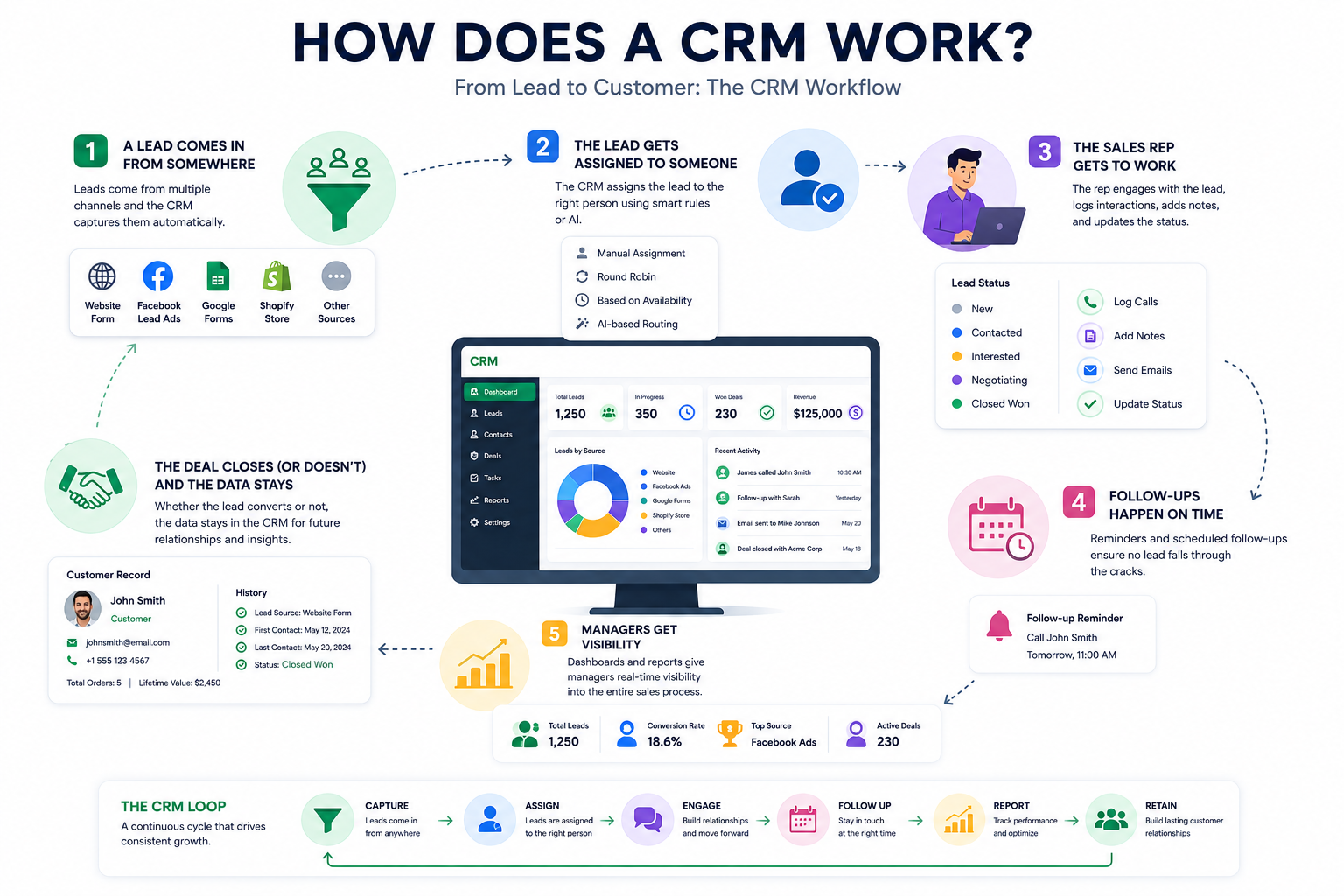
So you know what a CRM is — a system for keeping track of leads and customers instead of losing them in your inbox. But knowing what it is and understanding how it actually works day-to-day are two different things. Let's break down what actually happens behind the scenes, from the moment a lead shows up to the moment they become a paying customer.
Step 1: A Lead Comes In From Somewhere
Every CRM starts with the same question: where do your leads actually come from?
For most small businesses, it's not just one place. Someone fills out a contact form on your website. Someone else clicks a Facebook Lead Ad and submits their number without ever visiting your site. A customer places an order on Shopify and asks a question in the process. Someone fills in a Google Form at a trade show.
A CRM's first job is to catch all of that automatically. Instead of you (or someone on your team) manually checking five different platforms and typing details into a spreadsheet, the CRM pulls the lead in on its own — name, contact info, source, and whatever else was submitted — and creates a record for that person.
Step 2: The Lead Gets Assigned to Someone
Once a lead lands in the system, someone has to actually own it. This sounds obvious, but it's where a lot of small teams fall apart — leads sit untouched because everyone assumes someone else is handling it.
CRMs solve this through lead assignment. Depending on the system, this can happen a few different ways:
- Manual assignment – an admin looks at the lead and assigns it to a specific salesperson
- Round robin – leads get distributed evenly across the team, one after another
- Based on availability or past performance – some CRMs track who's free or who's converting best, and assign accordingly
- AI-based routing – the system looks at the lead's details and decides who's the best fit to handle it, based on patterns from past conversions
Step 3: The Sales Rep Gets to Work
Now the lead belongs to someone, and this is where the CRM becomes a working tool rather than just a filing cabinet.
The rep can see everything relevant in one place — how the lead came in, what they were interested in, any notes from earlier contact. They log calls, add notes after conversations, and update the status as things move forward (new, contacted, interested, negotiating, closed — whatever stages the business uses).
This matters more than it sounds like. If a rep goes on leave, or a lead takes three weeks to respond, whoever picks it up next isn't starting from scratch. The history is right there.
Step 4: Follow-Ups Happen on Time
Here's a fact that surprises a lot of people: most deals aren't lost because of price or product. They're lost because nobody followed up in time.
A CRM handles this through reminders and scheduled follow-ups. A rep can set a reminder to call someone back next Tuesday, and the system will actually nudge them — instead of relying on memory, sticky notes, or hoping it comes up naturally.
This one feature alone is often the difference between a CRM that gets used daily and a fancy database that gets ignored after week two.
Step 5: Managers Get Visibility
While all this is happening at the individual level, someone above the sales team usually needs a bigger-picture view — how many leads came in this week, which sources are converting best, which reps are following up on time and which aren't.
This is where dashboards and reporting come in. Instead of asking each rep for a status update, a manager can open the CRM and see:
- Total leads captured, and where they came from
- How many leads are still untouched
- Conversion rates by source, rep, or time period
- Overall team activity
This kind of visibility is hard to get from spreadsheets, especially once more than one or two people are involved.
Step 6: The Deal Closes (or Doesn't) — And the Data Stays
Eventually a lead either converts into a customer or doesn't. Either way, that record doesn't just disappear. It stays in the system as part of your customer history, which becomes useful later — for repeat business, for understanding what kind of leads convert best, or simply for having a full record if that customer reaches out again down the line.
Over time, this is what actually makes a CRM valuable. It's not just a tool for today's leads — it becomes a growing record of every relationship your business has ever had.
Putting It All Together
If you zoom out, a CRM is really just automating a loop that used to happen manually and inconsistently:
Capture → Assign → Engage → Follow up → Report → Retain
Every CRM does this loop a little differently, and some do it with a lot more polish than others. But the underlying mechanics are the same everywhere — the whole point is to make sure no lead gets lost between steps, and no step depends purely on someone remembering to do it.
The Bottom Line
A CRM isn't magic — it's just structure. It takes the same steps a business was already doing informally (someone reaches out, someone follows up, someone closes the deal) and makes sure those steps happen consistently, on time, and without depending on any one person's memory.
Once you see it as a loop rather than a single tool, it becomes a lot easier to judge whether a CRM is actually working for your team — or just sitting there as an expensive contact list.
