


5 min read
Aug 22, 2026
GreenCRM24 makes it easy to manage all lead-related information and activities from one place. Instead of using different tools to track customer interactions, you can manage important lead activities directly from the Lead Center.
How to Manage a Lead
- Log in to your GreenCRM24 account.
- Go to Lead Center from the dashboard.
- Click on the particular lead you want to manage.
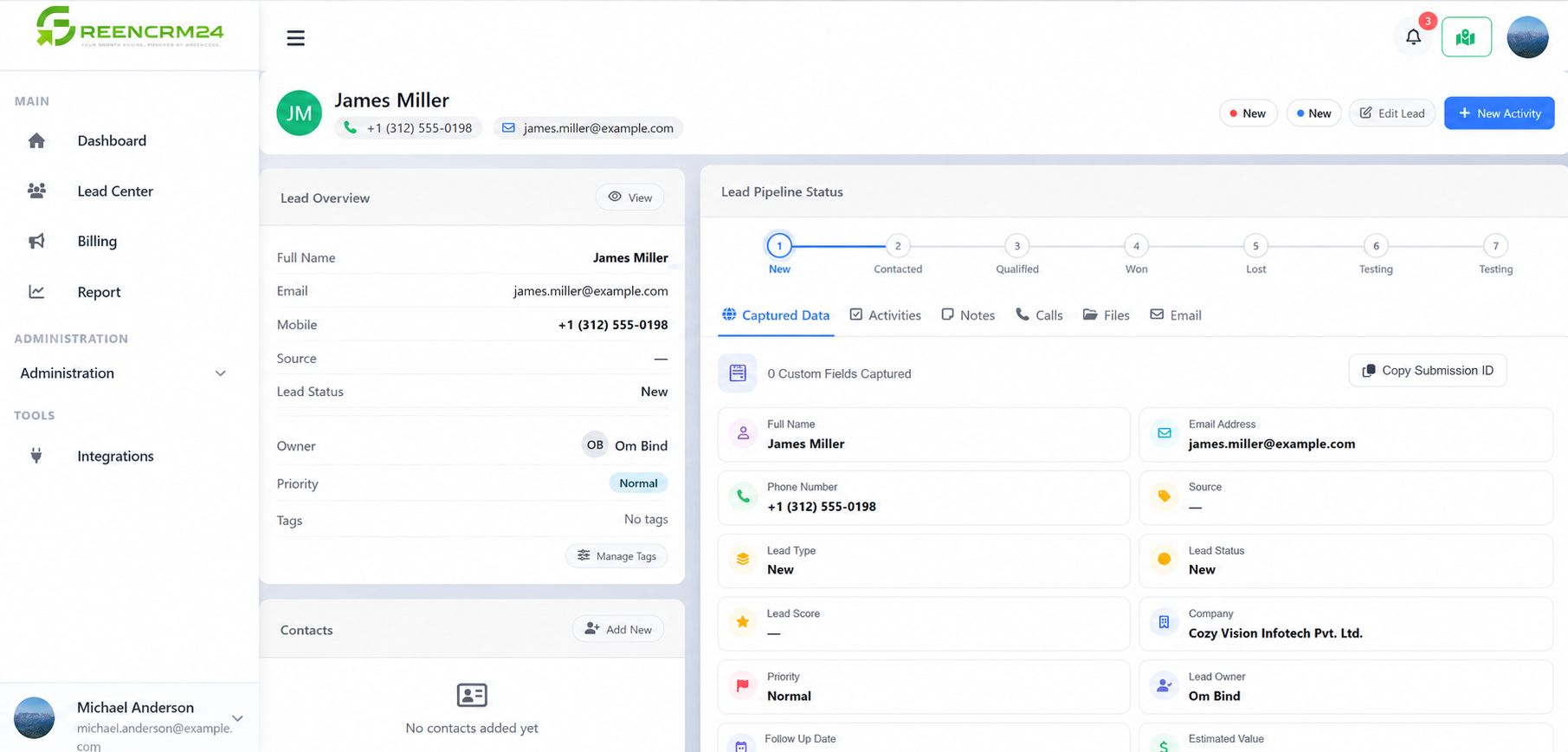
- Inside the lead details, you will find different options to manage customer information and interactions.
GreenCRM24 provides the following functions:
- Activities: Track and manage tasks or follow-up activities related to the lead.
- Notes: Add important information, comments, or discussion points for future reference.
- Calls: Record and manage call-related information with the lead.
- Files: Upload and manage documents or files related to the lead.
- Email: Manage email communication related to the lead.
Using these functions, your team can keep important lead information, communication, documents, and follow-ups organized in one place.
Tip: Update the lead record regularly after every important interaction. This helps your team maintain accurate information and understand the complete history of communication with each lead.
